Practical-11 Using Image Data, Predict the gender and age range of an individual in Python
Using image data, predict the gender and age range of an individual in Python
In this Python Project, we will use Deep Learning to accurately identify the gender and age of a person from a single image of a face. We will use the models trained by Tal Hassner and Gil Levi. The predicted gender may be one of ‘Male’ and ‘Female’, and the predicted age may be one of the following ranges- (0–2), (4–6), (8–12), (15–20), (25–32), (38–43), (48–53), (60–100) (8 nodes in the final softmax layer). It is very difficult to accurately guess an exact age from a single image because of factors like makeup, lighting, obstructions, and facial expressions.
The CNN Architecture
The convolutional neural network for this python project has 3 convolutional layers:
- Convolutional layer; 96 nodes, kernel size 7
- Convolutional layer; 256 nodes, kernel size 5
- Convolutional layer; 384 nodes, kernel size 3
It has 2 fully connected layers, each with 512 nodes, and a final output layer of softmax type.
For face detection, we have a .pb file- this is a protobuf file (protocol buffer); it holds the graph definition and the trained weights of the model. We can use this to run the trained model. And while a .pb file holds the protobuf in binary format, one with the .pbtxt extension holds it in text format. These are TensorFlow files. For age and gender, the .prototxt files describe the network configuration and the .caffemodel file defines the internal states of the parameters of the layers.
- We use the argparse library to create an argument parser so we can get the image argument from the command prompt. We make it parse the argument holding the path to the image to classify gender and age for.
- For face, age, and gender, initialize protocol buffer and model.
- Initialize the mean values for the model and the lists of age ranges and genders to classify from.
- Now, use the readNet() method to load the networks. The first parameter holds trained weights and the second carries network configuration.
- Make a call to the highlightFace() function with the faceNet and frame parameters, and what this returns, we will store in the names resultImg and faceBoxes. And if we got 0 faceBoxes, it means there was no face to detect.
Here, net is faceNet- this model is the DNN Face Detector.
i. Create a shallow copy of frame and get its height and width.
ii. Create a blob from the shallow copy. Set the input and make a forward pass to the network.
iii. faceBoxes is an empty list now. for each value in 0 to 127, define the confidence (between 0 and 1). Wherever we find the confidence greater than the confidence threshold, which is 0.7, we get the x1, y1, x2, and y2 coordinates and append a list of those to faceBoxes.
iv. Then, we put up rectangles on the image for each such list of coordinates and return two things: the shallow copy and the list of faceBoxes.
- But if there are indeed faceBoxes, for each of those, we define the face, create a 4-dimensional blob from the image. In doing this, we scale it, resize it, and pass in the mean values.
- We feed the input and give the network a forward pass to get the confidence of the two class. Whichever is higher, that is the gender of the person in the picture.
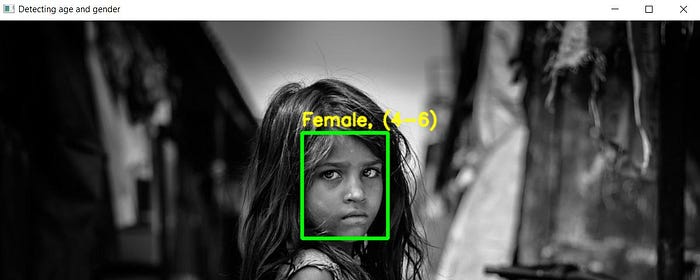
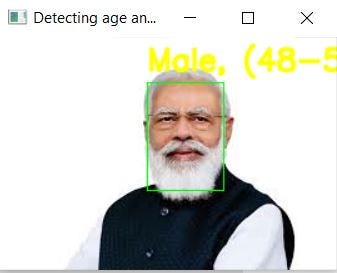
- Then, we do the same thing for age, we’ll add the gender and age texts to the resulting image and display it with imshow().
import cv2
import math
import argparsedef highlightFace(net, frame, conf_threshold=0.7):
    frameOpencvDnn=frame.copy()
    frameHeight=frameOpencvDnn.shape[0]
    frameWidth=frameOpencvDnn.shape[1]
    blob=cv2.dnn.blobFromImage(frameOpencvDnn, 1.0, (300, 300), [104, 117, 123], True, False)net.setInput(blob)
    detections=net.forward()
    faceBoxes=[]
    for i in range(detections.shape[2]):
        confidence=detections[0,0,i,2]
        if confidence>conf_threshold:
            x1=int(detections[0,0,i,3]*frameWidth)
            y1=int(detections[0,0,i,4]*frameHeight)
            x2=int(detections[0,0,i,5]*frameWidth)
            y2=int(detections[0,0,i,6]*frameHeight)
            faceBoxes.append([x1,y1,x2,y2])
            cv2.rectangle(frameOpencvDnn, (x1,y1), (x2,y2), (0,255,0), int(round(frameHeight/150)), 8)
    return frameOpencvDnn,faceBoxesparser=argparse.ArgumentParser()
parser.add_argument('--image')args=parser.parse_args()faceProto="opencv_face_detector.pbtxt"
faceModel="opencv_face_detector_uint8.pb"
ageProto="age_deploy.prototxt"
ageModel="age_net.caffemodel"
genderProto="gender_deploy.prototxt"
genderModel="gender_net.caffemodel"MODEL_MEAN_VALUES=(78.4263377603, 87.7689143744, 114.895847746)
ageList=['(0-2)', '(4-6)', '(8-12)', '(15-20)', '(25-32)', '(38-43)', '(48-53)', '(60-100)']
genderList=['Male','Female']faceNet=cv2.dnn.readNet(faceModel,faceProto)
ageNet=cv2.dnn.readNet(ageModel,ageProto)
genderNet=cv2.dnn.readNet(genderModel,genderProto)video=cv2.VideoCapture(args.image if args.image else 0)
padding=20
while cv2.waitKey(1)<0:
    hasFrame,frame=video.read()
    if not hasFrame:
        cv2.waitKey()
        breakresultImg,faceBoxes=highlightFace(faceNet,frame)
    if not faceBoxes:
        print("No face detected")for faceBox in faceBoxes:
        face=frame[max(0,faceBox[1]-padding):
                   min(faceBox[3]+padding,frame.shape[0]-1),max(0,faceBox[0]-padding)
                   :min(faceBox[2]+padding, frame.shape[1]-1)]blob=cv2.dnn.blobFromImage(face, 1.0, (227,227), MODEL_MEAN_VALUES, swapRB=False)
        genderNet.setInput(blob)
        genderPreds=genderNet.forward()
        gender=genderList[genderPreds[0].argmax()]
        print(f'Gender: {gender}')ageNet.setInput(blob)
        agePreds=ageNet.forward()
        age=ageList[agePreds[0].argmax()]
        print(f'Age: {age[1:-1]} years')cv2.putText(resultImg, f'{gender}, {age}', (faceBox[0], faceBox[1]-10), cv2.FONT_HERSHEY_SIMPLEX, 0.8, (0,255,255), 2, cv2.LINE_AA)
        cv2.imshow("Detecting age and gender", resultImg)
Output:







Comments
Post a Comment